




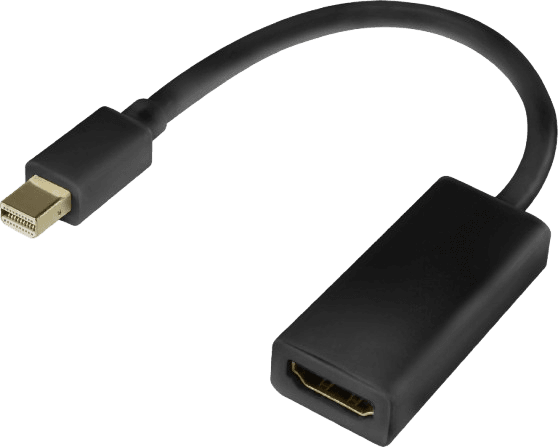
Mini Display to HDMI Adapter
Only 1 left in stock
- Brand –
- Model –
- Warranty –
රු1,400.00

Only 1 left in stock
Free Courier for Warranty Claims
We cover return courier charges within the 1st year! (Click for details)
🔌 Mini DisplayPort to HDMI Adapter — Specifications
📌 General
-
Name: Mini DisplayPort → HDMI Adapter
-
Type: Video signal adapter/dongle
-
Purpose: Connects a Mini DisplayPort output (from a laptop, desktop GPU, or device) to an HDMI input on a display device.
🔌 Connector Types
-
Input Side: Mini DisplayPort (mDP) male
-
Output Side: HDMI (Type A) female
-
Adapter Form: Compact dongle or short cable
📺 Supported Video
-
Maximum Resolution: Up to 4K UHD (3840×2160)
-
Typically supports 4K @ 30 Hz and many adapters support 4K @ 60 Hz if HDMI 2.0 capable
-
-
Common Resolutions Supported:
-
1920×1080 (1080p @ 60 Hz)
-
2560×1440 @ 60 Hz
-
3840×2160 @ 30 Hz or 60 Hz
-
-
HDMI Version Support: Usually HDMI 1.4 or HDMI 2.0 depending on adapter quality
🔊 Audio Support
-
Yes: Carries both digital video and audio from Mini DisplayPort to HDMI
-
Audio Formats: Stereo audio and multichannel audio (5.1) supported if the source device’s port supports audio output
⚙️ Compatibility
-
Devices: Laptops, desktops, Apple Macs (older Macs with Mini DP or Thunderbolt), Surface devices
-
Operating Systems: Windows, macOS, Linux — plug-and-play
-
Displays: HDTVs, monitors, projectors with HDMI input
🛠️ Features
-
Plug-and-Play: No drivers required
-
Compact & Portable: Easy for travel, presentations, and docking setups
-
Housing: May have molded plastic or aluminum shell
-
Gold-Plated Connectors: Better conductivity and corrosion resistance (on many versions)
| Weight | .2 kg |
|---|
There are no reviews yet.